
Latest version:5.0.1 build 1126.November 28, 2025.
The HTTP POSTexport supports application/x-www-form-urlencoded by default and optionally application/json, application/soap, text/plain, or application/binary. You can create a prebuilt body using HTTP_DATA or HTTP_DATA_RAW parser variables. HTTP_DATA is UTF-8 encoded and escaped; HTTP_DATA_RAW is sent as-is. When not using a raw body, the plugin composes the payload from listed parameters or, if the list is empty, from all available parser variables. You can include placeholders for parser variable like {PARSER_VALUE} in the URL. The plugin will replace them with the corresponding parser value before sending.
HTTP GETis similar to POST but limited to 1024 bytes. If a data packet contains HTTP_DATA it will be URL encoded and appended to the request URL; HTTP_DATA_RAW will be appended without encoding. If both special variables are omited in a data packet, the plugin appends other parser variables to the URL. GET is useful for quick or legacy webhooks.
The InfluxDB exportmodule enables our data loggers to publish time series data directly to InfluxDB using the database HTTP API. It supports writing points with tags, fields, and timestamps. The module automatically converts parser variables into InfluxDB data points. It can also buffer data locally when the server is unavailable so no data is lost during transient outages.
Assume a parsed data packet with variables:
The plugin will produce an HTTP POST request body according to the InfluxDB specification.
Sample POST body when using form encoding (conceptual):
measurement=sensor_readings &device=S-100 &site=plantA &temp=72.35 &pressure=101325 ×tamp=2026-01-02 08:00:00
HTTP_DATA_RAW = '{"measurement":"sensor_readings","tags":{"device":"S-100","site":"plantA"},"fields":{"temp":72.35,"pressure":101325},"time":"2026-01-02 08:00:00"}'
The HTTP/InfluxDB export plugin provides reliable export over HTTP. It converts parser variables into typed tags and fields, supports JSON and other encodings in the request body, and OAuth2. It can create temporary local copies of data in case of connectivity issues.
The figure below shows how to select the plugin on the “Modules” page.
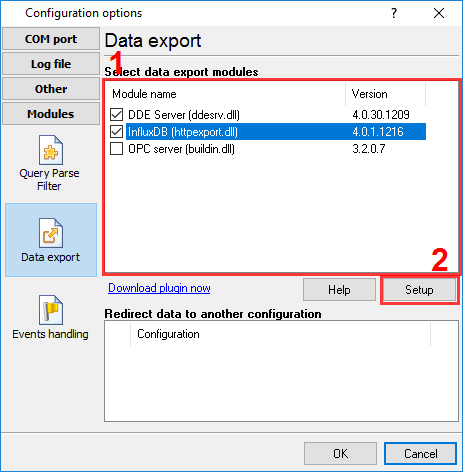
Fig.1. Selecting the plugin.
The figure below shows how to configure the plugin to poll the device every 15 seconds. Of course, you may change the poll interval as you want.
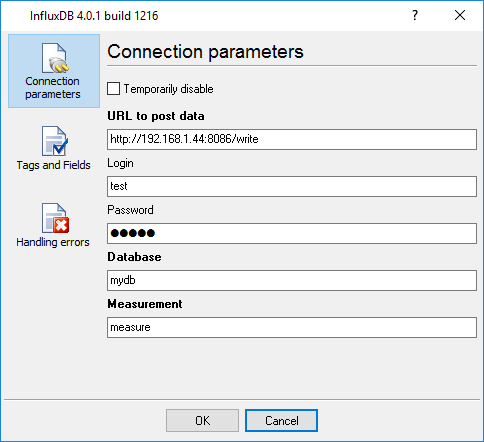
Fig.2. Configuring the plugin.
All plugins | SQL Database Professional | Cloud Database Professional | ODBC database | Direct Excel/OpenOpffice Calc/LibreOffice Calc Connection | Google Sheets Professional | Excel Export Professional | Send keystrokes | DDE Server | Local (desktop) database | Geo Export | Printer out | Web Server | HTTP POST GET & InfluxDB Export | SFTP Export | MQTT data receiving and publishing | OPC UA Server