
Latest version:5.0.1 build 1224.December 24, 2025.
The Cloud Database Professional export module sends parsed data from our data loggers (for example, Equvera CoNNeX Data Logger Suite) to SQL-compatible cloud databases: Microsoft Azure, MySQL, PostgreSQL, MariaDB, MongoDB, Amazon Aurora, and Amazon Redshift. It uses vendor drivers for direct access. That reduces system overhead and network chatter. It also lets you use database-specific features such as stored procedures.
The module writes data in real time over secure connections. If the remote database is unavailable, the plugin can keep a local backup until the connection is restored. You can queue one or more custom SQL statements. The queue can contain SELECT, INSERT, UPDATE, stored procedure calls, or database-specific commands. Returned rows can be used in subsequent statements.
Download Documentation Buy Now!
Example: A factory sensor sends temperature readings every 10 seconds. The parser creates variablesTEMP and TS. A two-statement SQL queue first runs a SELECT to compute next_id, then an INSERT uses next_id, TEMP, and TS. If the database is offline at 2026-01-02 08:00:00, the plugin writes the record to the temporary file. When the database returns, it restores and publishes queued records in order.
This example shows a common workflow: the logger receives raw data, a parser extracts variables, and the Cloud Database Professional plugin publishes them.
1. Equvera CoNNeX Data Logger Suite – incoming serial data:
ID=17;TEMP=72.4;HUM=38;TS=2026-01-02 08:00:00
2. Parser output variables:
ID=17 TEMP=72.4 HUM=38 TS=DATE_TIME_STAMP
3. Export SQL queue (example):
SELECT (max(log_id)+1) AS next_id FROM readings INSERT INTO readings (log_id, device_id, temp, hum, ts) VALUES (:next_id, :ID, :TEMP, :HUM, ':TS')
Download Documentation Buy Now!
The figure below shows how to select the plugin on the “Modules” page.
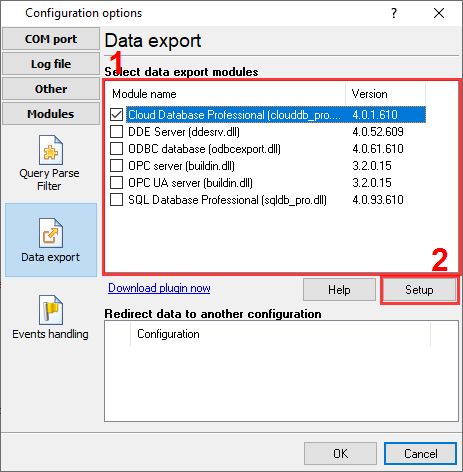
Fig.1. Selecting the plugin.
The figure below shows how to configure the plugin. Please, look at the documentation for the full description of all settings.
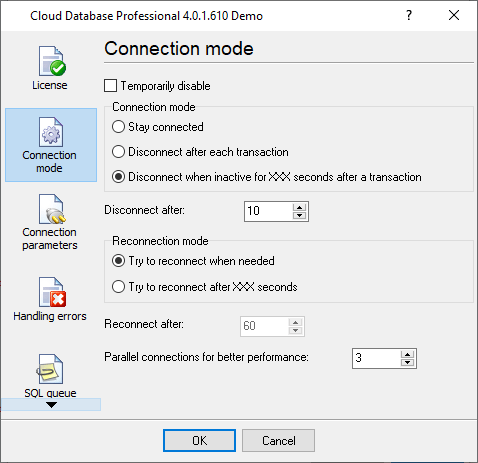
Fig.2. Configuring the plugin.
All plugins | SQL Database Professional | Cloud Database Professional | ODBC database | Local (desktop) database