
Latest version:4.0.19 build 520.May 20, 2020.
The OPC UA Server plugin exposes real-time data from our data loggers as standard OPC UA Data Access variables. It lets OPC UA clients connect to your existing logging system and read process values, device states, counters, and calculated parameters in a consistent and secure way. This page explains how the plugin works, how to configure it, and how to integrate it with your OPC UA client applications.
OPC UA (Unified Architecture) is a platform-independent protocol for machine to machine communication. It replaces classic OPC based on DCOM and removes dependency on the Windows COM stack. The OPC UA Server plugin follows the Data Access profile, which focuses on current values, quality flags, and timestamps. You can run your OPC UA clients on Windows, Linux, or macOS and connect to the server using standard OPC UA libraries.
The plugin runs as an OPC UA server instance hosted by the logger application. It subscribes to parser variables produced by the logging engine and exposes them as OPC UA nodes. Each parser variable becomes an OPC UA variable with attributes such as value, data type, timestamp, and quality. When new data arrives from a serial port or TCP connection, the logger updates the variable, and all subscribed OPC UA clients receive the new values. This allows you to reuse the same data flow for logging, visualization, and control system integration.
To connect an OPC client, you need the server URI, for example:
opc.tcp://WORKSTATION-AS23ND:10003
The plugin configuration defines several important properties:
To integrate the OPC UA Server plugin with Equvera CoNNeX Data Logger Suite:
Incoming serial line (COM1):
2026-01-02 08:00:00;DEVICE01;25.6;OK
Parsed variables:
DATE_TIME_STAMP = 2026-01-02 08:00:00 DEVICE_ID = "DEVICE01" TEMP_C = 25.6 STATUS = "OK"
OPC UA Data Access:
Node = COM1/DEVICE01/TEMP_C Value = 25.6 DataType = Double Timestamp = 2026-01-02 08:00:00 Quality = Good
The OPC UA Server plugin extends our loggers with a well-supported industrial interface for control, analytics, and visualization systems. By exporing parsed variables directly to OPC UA Data Access nodes, it reduces integration work and improves data consistency between your data logging system, SCADA, and other industrial applications.
The figure below shows how to select the plugin on the “Modules” page.
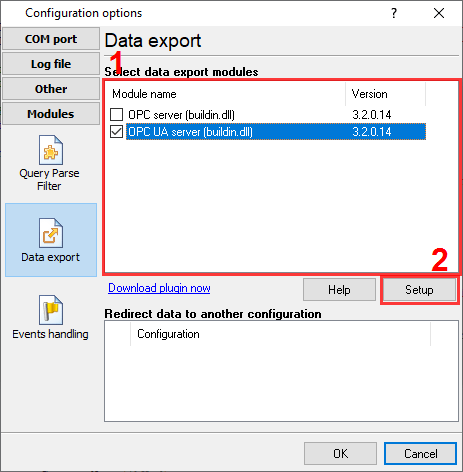
Fig.1. Selecting the plugin.
The figure below shows how to configure the plugin. Please, look at the documentation for the full description of all settings.
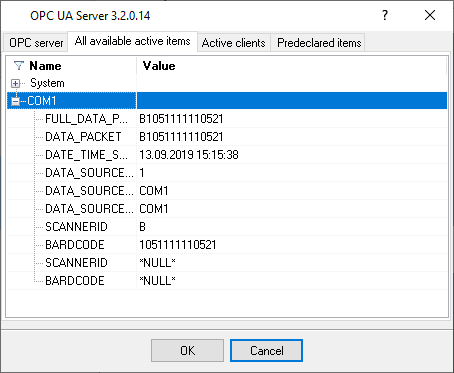
Fig.2. Configuring the plugin.
All plugins | SQL Database Professional | Cloud Database Professional | ODBC database | Direct Excel/OpenOpffice Calc/LibreOffice Calc Connection | Google Sheets Professional | Excel Export Professional | Send keystrokes | DDE Server | Local (desktop) database | Geo Export | Printer out | Web Server | HTTP POST GET & InfluxDB Export | SFTP Export | MQTT data receiving and publishing | OPC UA Server