
I need to send data to two databases on different servers.
Note: you may send different data sets to each database.
Requirements:
Solution:
1. Each plugin instance allows you to define connection settings with one database. First of all, you should create a new instance of the database plugin. Go to “program folder → plugins → sqldbpro” or “program folder → plugins → odbcexport” for the corresponding plugin. Please, note, the default program folder is:
32-bit OS: c:\Program Files\[Program Name] 64-bit OS: c:\Program Files (x86)\[Program Name]
2. Make a copy of the DLL file in the same folder. For example, copy “sqldb_pro.dll” to “sqldb_pro2.dll”, or “odbcexport.dll” to “odbcexport2.dll”. Repeat this action if you need several instances of the plugin.
3. Restart the logger.
4. The new plugin instance should appear in the list of data export plugin (fig. 1). Please pay your attention to the file name trailing the module name.
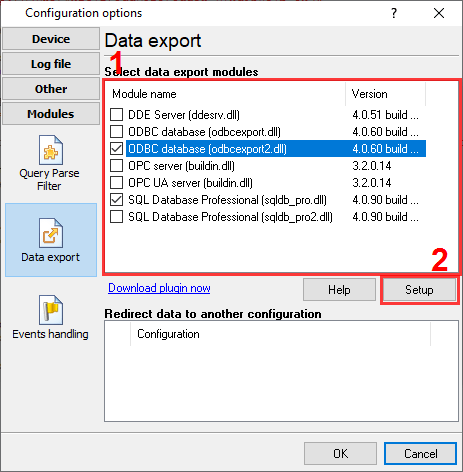
Fig. 1. Plugin instances.
5. Now, you can configure each plugin instance separately, including the connection settings with a database. All instances will work simultaneously and process data in parallel.