
Problem scenario:
I can successfully test and read data from my MODBUS RTU device using the Simply MODBUS RTU Master software. How can I copy a MODBUS query settings to your logger because I would like to monitor my device for a long time?
It is assumed that:
You can successfully read data from your MODBUS device using Simply MODBUS(fig. 1).
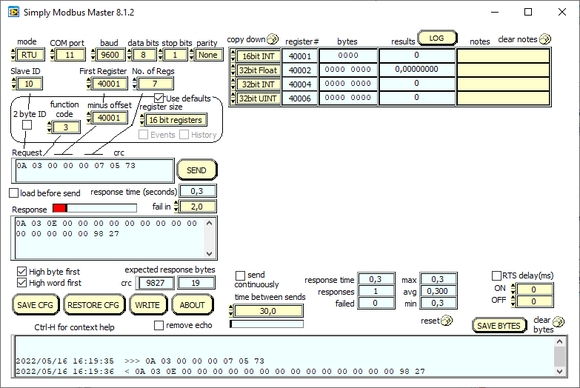
Fig. 1: Simply MODBUS RTU query settings.
Solution:
1. Create a new configuration from the main window using the “Green Plus” button. (fig. 2). This example shows the connection settings for MODBUS RTU. If your device uses MODBUS TCP, look here
. Copy all communication parameters from Simply MODBUS:
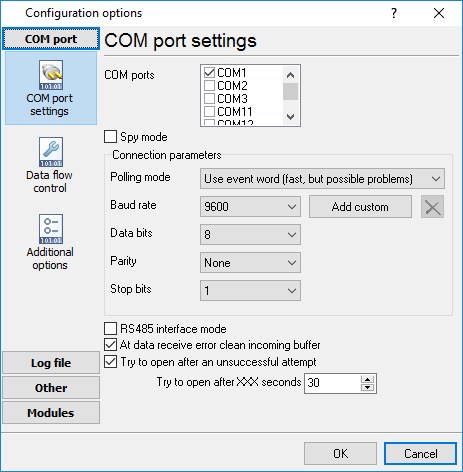
Fig. 2: Configuring RS232 MODBUS RTU connection.
2. Activate the “MODBUS RTU” plugin in the settings in both fields “Data query module” and “Parser module” (fig. 3). Please do not confuse it with “MODBUS RTU [Passive]” or “MODBUS RTU [Slave]” because they realize other functionality. We configure the MODBUS master station. Note: If your settings “Register size” is “32 bit registers”, you should select the “MODBUS RTU [Enron]” in both fields.
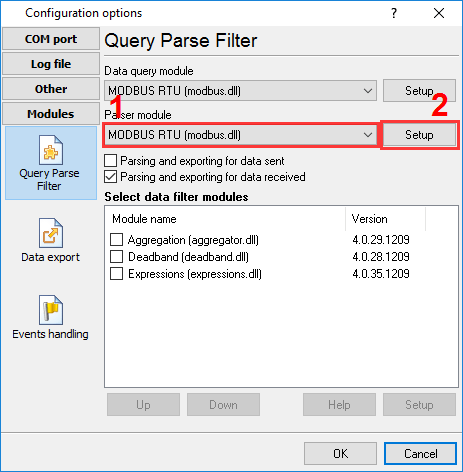
Fig. 3: Activating the MODBUS RTU plugin.
3. In the MODBUS RTU plugin settings, click the “Action → Add new request” button to add a new query request (fig. 4). Copy basic request settings from Simply MODBUS:
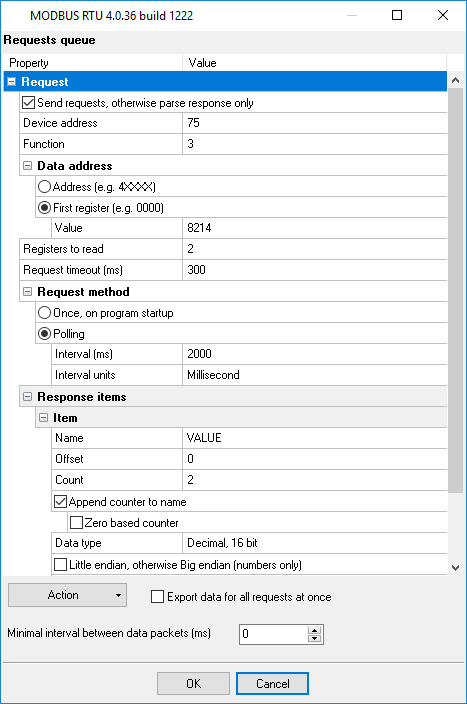
Fig. 4: Basic MODBUS query settings.
4. Add the necessary number of response items by clicking the “Action → Add response item” button:
Note: The figure below is an example. It does not match response items on fig. 1. The full correct list of response items will look like:
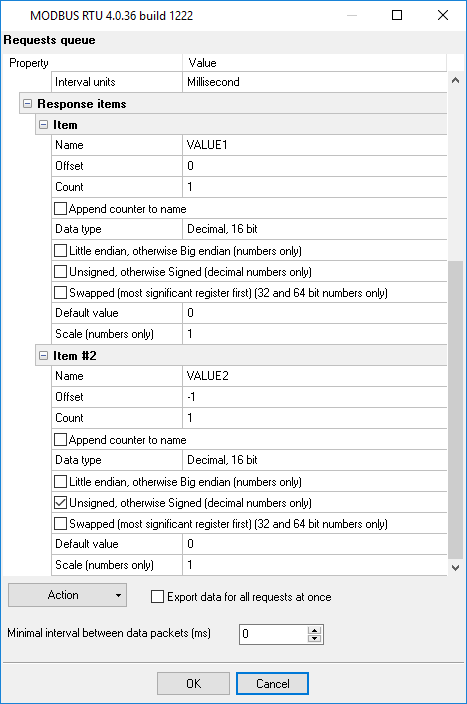
Fig. 5: MODBUS response items.
How can I poll multiple MODBUS RTU devices?
MODBUS RTU allows you to connect up to 254 devices on one RS-485 bus. You may specify several addresses like 1,2,3,4,5 in the ” Device address” field (fig. 4).
Can I poll MODBUS TCP devices?
Yes, of course. The settings are almost identical. You should configure the TCP connection settings and select other parser type (MODBUS TCP instead of MODBUS RTU) (fig. 3).