
GSM modem(s) must be connected directly to the server where the program is running. The following requirements should
be observed when you connect a GSM modem:
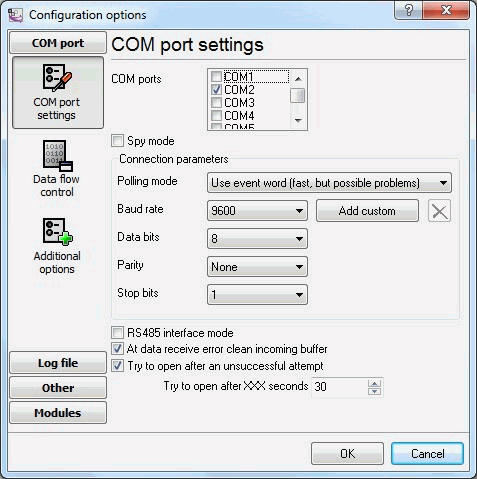
Fig. 1 Data transfer options
It is possible to configure advanced modem options on the “Advanced options” tab (fig. 2).
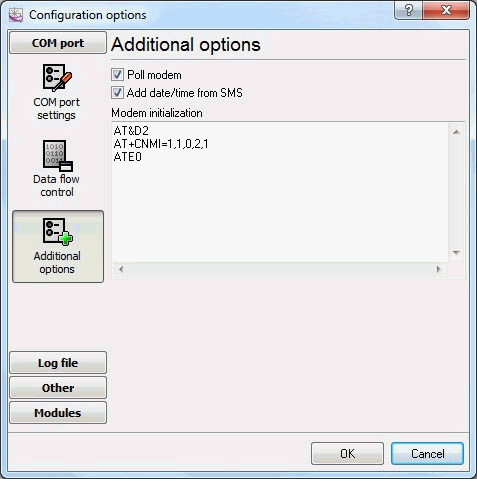
Fig. 2 Advanced options
Poll modem– if this option is enabled, the plug-in will query the modem every 3 seconds for new text messages.
This mode is used if the GSM modem cannot notify the computer when a new text message is received.
Modem initialization– modem initialization string(s). It is a list of AT commands that are sent when
a connection to the modem is being established. One command per line. For example:
AT&D2 AT+CNMI=1,1,0,2,1 ATE0
In this case, the modem is configured to send notifications to the computer when a new text message is received.
Note: different initialization commands can be used for different types of modems, for example:
Siemens: AT+CNMI=1,1,0,2,1 WaveCom: AT+CNMI=2,1,0,1,1 SonyEricsson: AT+CNMI=3,1,0,1,0 Motorola USB modem:
AT+CNMI=3,1,0,0,0
This command affects the process of receiving messages and receipt reports, if it is specified incorrectly problems
with receiving them may occur. That is why it is recommended to make sure that parameters of this command correspond
to the documentation of your modem. It is also possible to use other commands to optimize the operation of modems.
Below you can see the instructions how to preliminarily configure modems using Hyperterminal (the standard Windows
program) or any other terminal software.
1. Connect the modem to the computer and wait till it is registered in the GSM network. Configure the modem port
speed (as a rule, 9600 or 19200 bps), open the port.
2. Make sure the modem is active with the help of simple commands:
ATZ (modem reset), ATI (manufacturer’s identification), ATE1 (echo on).
3. Configure the modem for the correct text message transfer, check the text message transfer mode using the command
AT+CMGF?
the response should be
+CMGF: 0,
which means that modem is in the SMS PDU mode necessary for the plug-in to run, otherwise switch the modem into this
mode using the command
AT+CMGF=0
the response is OK.
4. Configure the modem to save incoming and outgoing text messages to the SIM card using the command
AT+CPMS?
the response is +CMPS: “SM”,0,20, “SM”,0,20, “SM”,0,20.
If the response is different (for example: +CMPS: “ME”,0,20, “SM”,0,20, “ME”,0,20), use the AT+CPMS=”SM”, “SM”, “SM”
command to enable the necessary configuration.
5. Save this configuration to the modem profile using the AT&W command.
6. Use the ATZ command to reset the modem and send the AT+CMGL=4 command (the response is OK or the list of saved
text messages) to make sure that you have specified the correct settings.