
Latest version:5.0.1 build 1126.November 28, 2025.
The BACnet/IP module reads values from BACnet-compatible devices on a local Ethernet network. It polls devices and sensors at set intervals. The module then sends the received values to the main program. The main program can log them, write them to a database, or pass them to export modules. It can also discover devices using broadcast addresses.
The module supports a request queue. Each request targets one or more devices and is processed top to bottom. You can set the logger to poll repeatedly on a fixed interval or at the specified time. Requests may be sent to a single device IP and port, to multiple device instances, or to a broadcast address such as 192.168.1.255 to find devices automatically. Use semicolons to list multiple instance IDs, for example, 1345;1346. The asterisk (*) can be used to poll all discovered devices.
Configure the request timeout in milliseconds. If no response arrives before the timeout, the request is canceled and the module continues with the next entry. Late responses that arrive after the timeout are ignored. Because the module processes requests sequentially, set polling periods so the queue can be completed in the expected cycle time.
Each request includes one or more response elements. A response element defines a variable name, data type, and instance index inside the device. The variable name is used by the main program and by export modules. Make these names unique within a request. Names across different requests may repeat if you want identical labels for the same metric from different devices.
The data type must match what the device supports. Some devices expose only analog values; others provide discrete or binary data. Choose types that match device capabilities to avoid read errors. You can edit, move, or remove requests in the queue through the Action menu or by right-clicking the request tree.
Example: Incoming BACnet data (as received by the logger)
Timestamp: DATE_TIME_STAMP Source: 192.168.1.45:47808 Device Instance: 1345 Response: - Name: TempRoom1 Type: Analog Instance: 1 Value: 22.8 - Name: FanStatus Type: Binary Instance: 2 Value: 1
Example: Exported CSV line after processing
DATE_TIME_STAMP,192.168.1.45,1345,TempRoom1,22.8,FanStatus,1
Practical scenario: Poll HVAC sensors every 30 seconds
The figure below shows how to select the plugin on the “Modules” page.
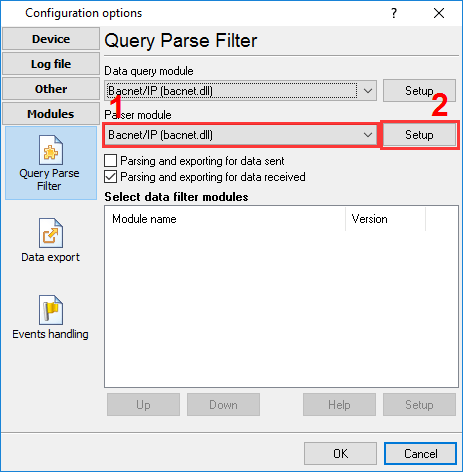
Fig.1. Selecting the plugin.
The figure below shows how to configure the plugin to poll the device every 15 seconds. Of course, you may change the poll interval as you want.
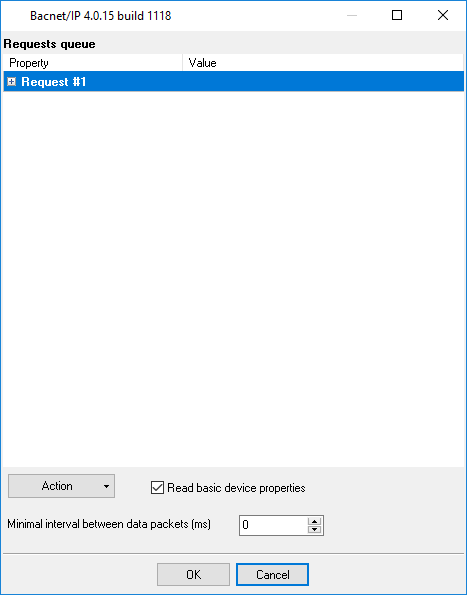
Fig.2. Configuring the plugin.
All plugins | MODBUS RTU, MODBUS TCP, MODBUS ASCII | M-Bus | Bacnet/IP | IEC 62056-21 | DLMS/COSEM | DL-T645-2007 | CJ/T 188-2004 | Kamstrup [KMP protocol]