
Latest version:5.0.1 build 1126.November 28, 2025.
The M-Busplugin provides reliable reading and logging of metering devices using the M-Bus protocol (Meter-Bus). It supports energy and utility meters for heat, water, gas, and electricity and returns full lists of available measurement points with units. The plugin supports primary and secondary addressing and can manage large networks with up to 250 devices on a single M-Bus line.
The plugin issues configured requests to M-Bus devices, receives packets, validates checksums, and extracts values and timestamps. It handles both instant and archived data, supports batch polling of multiple devices, and can automatically discover devices by primary and secondary address. The plugin can also filter by storage and tariff identifiers and skip already processed or older archive values for efficiency.
Example 1: Read instant energy consumption from a single electricity meter at 2026-01-02 08:00:00. Configure a request with device address 12 and storage number 0. The plugin returns the current energy reading with unit kWh and the timestamp stored in DATE_TIME_STAMP.
Example 2: Poll archived hourly gas volumes from meters with primary addresses 5,6,7. Configure process tariffs empty (all tariffs) and process storage numbers 1,2 to retrieve hourly archive records. Use “Read new data only” to avoid duplicate archive processing.
You define one or more requests. Each request can have these key options: device address (primary or secondary), storage numbers, tariffs, and response timeout. Use comma-separated lists for multiple addresses, storage numbers, or tariffs. Set address 254 to query all devices and collect secondary addresses.
Example integration – single meter polling:
Incoming (serial) from device:
[STX] 68 05 05 68 08 01 72 34 56 78 16
Parsed fields:
- Device address: 5 - Value: 123.45 kWh - Timestamp: 2026-01-02 08:00:00
Exported (to logger output):
Device=5;Point=Energy;Value=123.45;Unit=kWh;Timestamp=2026-01-02 08:00:00
The M-Bus plugin is a robust, configurable module for reading instant and historical meter data from single devices or in large M-Bus networks. It supports flexible polling schemes, request queues, and data integrity checks.
The figure below shows how to select the plugin on the “Modules” page.
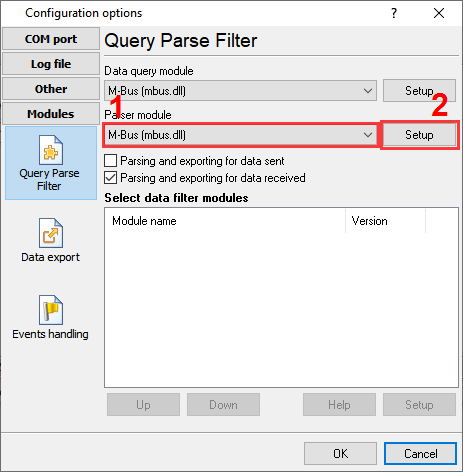
Fig.1. Selecting the plugin.
The figure below shows how to configure the plugin. Please, look at the documentation for the full description of all settings.
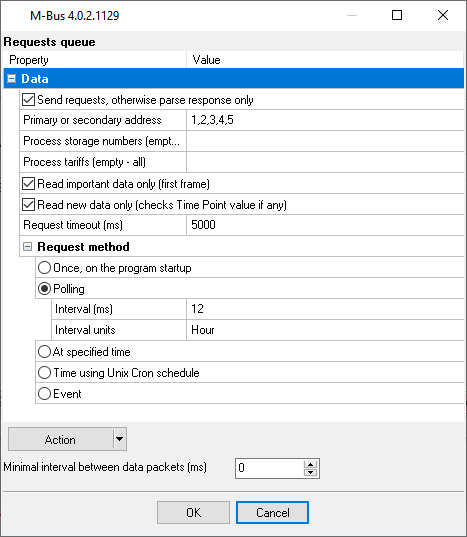
Fig.2. Configuring the plugin.
All plugins | MODBUS RTU, MODBUS TCP, MODBUS ASCII | M-Bus | Bacnet/IP | IEC 62056-21 | DLMS/COSEM | DL-T645-2007 | CJ/T 188-2004 | Kamstrup [KMP protocol]