0
Items : 0
Subtotal :  0.00
View CartCheck Out
Chennai
Chennai
Singapore
Mumbai
Switzerland
Mon - Fri 09:00 - 18:30 766/1, TEZ, Sakthi Towers 1, Anna salai, Chennai 600 002.
+65 9324 8815 Mon - Fri 09:00 - 18:30 171, TRAS STREET 07 175 UNION BUILDING, SINGAPORE 079025.
Mon - Fri 09:00 - 18:30 5, Powai Lake Heights, Mumbai 400 072
Mon - Fri 09:00 - 18:30 Equvera - ISV Techno SAGL, Via Ligornetto 6A, 6855 Stabio, Switzerland
Ceritified
ISO 9001:2008
The Best
#1 in India
Number #1
AUTOMATION SOLUTION PROVIDER
Talk to an Expert
0
Items : 0
Subtotal :  0.00
View CartCheck Out
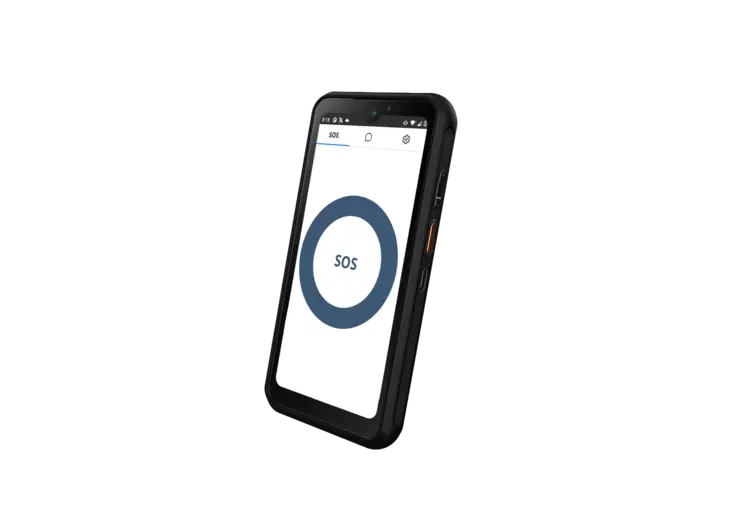
csm_App-iTAG-XM-Image_3d908eeae2csm_App-iTAG-XM-Image_3d908eeae2

iTAG XM App

Android smartphone app for worker location tracking
  • Accurately locate your workers indoors and out
  • Install on any Ex certified Android smartphone
  • Wi-Fi or cellular connection to the network
  • No need to carry extra devices
Category:
Description
Technical Data
Manuals/Operating Instructions/Guides
Data Sheets

Bringing hybrid location tracking technologies to your Android Ex smartphone. The iTAG XM app is the next addition to our X-Range family of hybrid RTLS solutions for hazardous areas.

Make use of Wi-Fi/BLE RSSI trilateration for precise indoor positioning and GPS for outdoor tracking. Increase worker safety with an emergency SOS feature to quickly send help where it is needed.

The iTAG XM comes pre-installed on the BARTEC SP9 phone, but can be installed on any Ex Android phone. The initial setup is simple.

1. Install the APK and launch the app.

2. Set permissions for location, and other services.

3. Set up physical buttons if applicable.

4. Set up connection to Extronics Device Manager.

5. Select smartphone and set the required configuration within the EDM then “Apply” settings.

6. Phone will be automatically configured.

7. This can be verified by clicking the settings tab on the app.

Marking

Ambient Temperature

Technical Data

Android Compatibility

Version 6.0 and above

Connection

Wi-Fi or Cellular connection on handset

Communication

MQTT

Physical button option

Yes, Requires configurable button on handset

Manuals/Operating Instructions/Guides

    User manual – iTAG XM
    Release notes – iTAG XM

Data Sheets

    Datasheet – iTAG XM