
Latest version:5.0.1 build 1126.November 28, 2025.
The DNP3 data acquisition plugin adds DNP3 (Distributed Network Protocol) support to Equvera CoNNeX Data Logger Suite, Equvera CoNNeX TCP/IP Data Logger, and Data Logger Suite. It is designed for engineers and integrators who need to collect, decode, and export data from remote terminal units, intelligent electronic devices, and other field equipment in power, water, and industrial automation networks. The plugin works as a DNP3 master and can query any compatible external device that follows the DNP3 specification.
The plugin hides low-level protocol details and offers a structured configuration interface where you define requests, addresses, objects, and parsing rules. You can query binary inputs and outputs, analog inputs and outputs, counters, Class 0 integrity data, Class 1, Class 2, and Class 3 event data, as well as frozen and changed values. The plugin validates the CRC automatically of each received data packet before parsing.
You can adjust polling intervals, request timeouts, and response mappings to fit both small test benches and large distributed SCADA installations. The plugin can send multiple requests in sequence, automatically cancel slow or delayed requests, and move to the next one in the queue. This makes it suitable for mixed networks where some devices are connected by fast TCP links and others by slow radio modems or long serial lines. You can configure individual DNP3 requests that match each device profile and supported object list.
The plugin is fully integrated with the our data logger processing pipeline. Once the DNP3 packet is decoded, the extracted values are placed into the logger’s internal data model. Then you can use our other plugin to export data to CSV, databases, OPC servers , and call custom scripts.
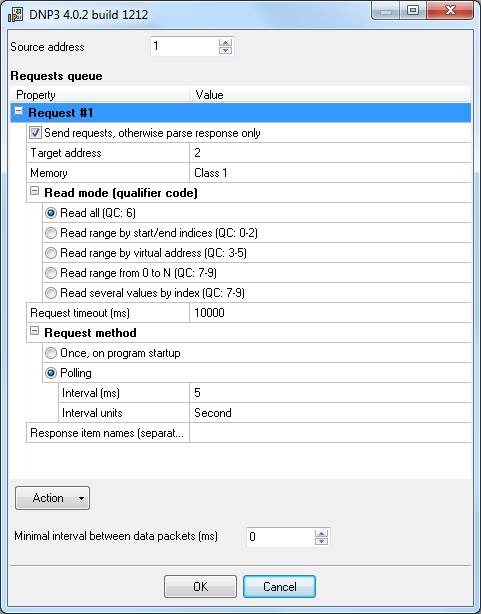
To configure a new DNP3 query, you create a request item in the plugin configuration. Use the menu command “Actions → Add new request” to open the request dialog. In that dialog, you enter a descriptive name for the request, for example, “Feeder 1 analog inputs” or “Station 5 binary status”, and then confirm with the OK button. The request appears in the request queue, where you can set other parameters and parsing rules.
Each request has several key options that define how the DNP3 master will communicate with the outstation:
If you do not specify response item names, the plugin generates default names based on value type and index:
When used with Equvera CoNNeX Data Logger Suite, the DNP3 plugin communicates with devices over serial interfaces such as RS 232, RS 422, and RS 485. The logger handles the physical port configuration, while the plugin focuses on the DNP3 protocol. A typical setup might include multiple RTUs connected in a multidrop RS 485 network, where the logger acts as the master station.
An example of received DNP3 data after decoding could look like this:
DATE_TIME_STAMP = 2026-01-02 08:00:00 DEVICE_ADDRESS = 12 AI0 = 12.34 ; Analog input 0 - feeder current A AI1 = 6.89 ; Analog input 1 - feeder voltage kV AI2 = 10.25 ; Analog input 2 - busbar current A AI3 = 6.92 ; Analog input 3 - busbar voltage kV CNT0 = 154320 ; Counter 0 - energy kWh CNT1 = 23140 ; Counter 1 - energy kVarh
You can then configure the logger export plugins to store these values in different ways. For example, the exported CSV line for the same scan could be:
2026-01-02 08:00:00,12,12.34,6.89,10.25,6.92,154320,23140
In a database export scenario, the plugin can map the parsed variables DATE_TIME_STAMP, AI0, AI1, AI2, AI3, CNT0, and CNT1 into appropriate table columns. This allows analysts to run queries on historical DNP3 data without dealing with raw protocol frames. Scheduled polling combined with the logger’s built-in export mechanisms provides continuous data recording.
This DNP3 plugin provides a practical and configurable way to read data from a wide variety of DNP3-compatible devices. It helps engineers collect, store, and forward DNP3 data without writing custom protocol handlers. You can move quickly from raw DNP3 frames to structured values ready for SCADA, reporting, or analytics.
The tutorials section contains several examples of how to configure the MODBUS pluginthat is very familiar with this plugin.
All plugins | DNP3 protocol | GE Fanuc Automation PLC (via CCM, SNP, SNP-X protocols) | Siemens SIMATIK PLC (S7-200, S7-300, S7-400, S5) | EtherNet/IP