
Latest version:5.0.1 build 1126.November 28, 2025.
The Siemens S7 MPI / PPI plugin adds direct communication with SIMATIC S5 or S7 controllers to Equvera CoNNeX Data Logger Suite, Equvera CoNNeX TCP/IP Data Logger, and Data Logger Suite. It supports S7 200, S7 300, and S7 400 PLC families and has been tested with Speed7 CPU and S7-compatible PLCs from SAIA. The plugin can read all standard memory areas that are available in your PLC program, such as flags, data blocks, input and output image memory, timers, and counters. It is designed for technical professionals who need stable and predictable data collection from Siemens controllers without additional middleware.
The plugin supports several communication paths so that you can integrate it into existing installations. Supported interfaces include MPI for S7 300 and S7 400, PPI for S7 200, ISO over TCP, ISO over TCP with CP243, and MPI via IBH NetLink MPI to Ethernet gateway. You can use either serial ports with an MPI or PPI adapter or TCP Ethernet connections, depending on your PLC hardware and available network infrastructure. Each request is configured with the parameters such as CPU type, connection type, protocol, rack, slot, and memory area.
For a TCP based configuration with an S7 300 or S7 400 CPU and CP343/443 or a compatible Ethernet CP, you configure the connection in Equvera CoNNeX TCP/IP Data Logger. You define a TCP client channel that connects to the PLC IP address at port 102, select the Siemens S7 MPI / PPI plugin for parsing, and then configure one or more requests inside the plugin. The logger then manages the TCP session while the plugin formats requests and interprets responses.
A typical data sample received from the PLC (simplified for illustration) might look like this:
2026-01-02 08:00:00 PLC_IP:102 → LOGGER_IP:50000 03 00 00 1B 02 F0 80 32 07 00 00 00 01 00 0E 00 00 04 01 12 0A 10 02 00 0A 00 00
S7 payload bytes (last part):
04 01 12 0A 10 02 00 0A 00 00
The plugin extracts the user data part of the S7 telegram, validates the CRC where applicable, and then maps bytes to internal variables. For example, if the configuration defines:
The parsed record in Equvera CoNNeX TCP/IP Data Logger can look like this:
DATE_TIME_STAMP = 2026-01-02 08:00:00 DB10_TEMPERATURE = 25.0 DB10_MOTOR_RUN = 1 DB10_MOTOR_FAULT = 0
You can then export this data to a CSV file , an SQL database , or an OPC server using the logger export plugins. An example CSV line generated by an export plugin might look like this:
2026-01-02 08:00:00;25.0;1;0
This approach gives you a stable and transparent way to log process values from Siemens PLCs over TCP without writing custom code.
This Siemens S7 MPI / PPI / ISO over TCP plugin gives our data loggers a robust interface to SIMATIC controllers. It hides low-level S5 and S7 protocol details while giving you precise control over which PLC data is read and how often. As a result, you can build reliable data logging and integration solutions on top of Siemens PLCs with minimal configuration effort.
The figure below shows how to select the plugin on the “Modules” page.
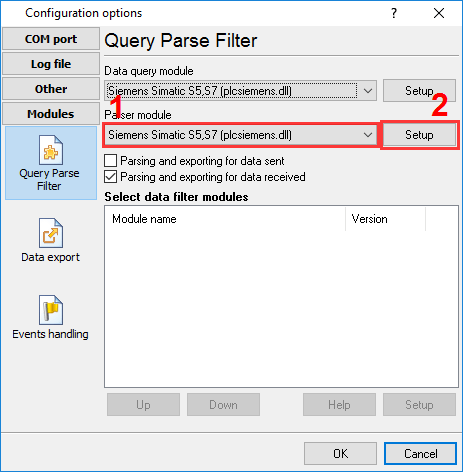
Fig.1. Selecting the plugin.
The figure below shows how to configure the plugin. Please, look at the documentation for the full description of all settings.
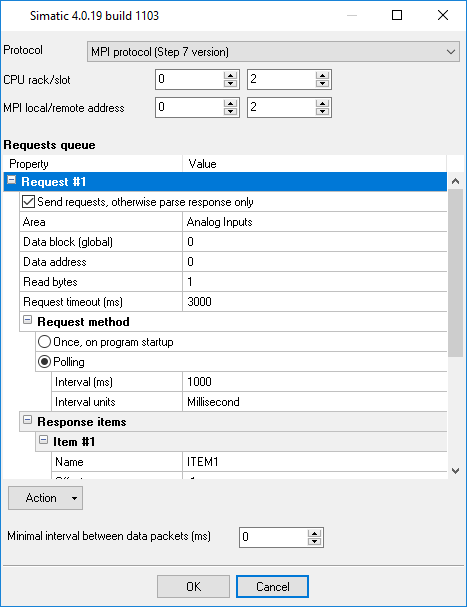
Fig.2. Configuring the plugin.
All plugins | DNP3 protocol | GE Fanuc Automation PLC (via CCM, SNP, SNP-X protocols) | Siemens SIMATIK PLC (S7-200, S7-300, S7-400, S5) | EtherNet/IP