
Latest version:5.0.1 build 1126.November 28, 2025.
Data Encode is a data transformation plugin designed for engineers, system integrators, and support teams who need to convert parsed values into structured text formats. It runs inside our data logging products and produces JSON, XML-RPC, or CSV strings from variables created by various parsers. These formats are widely accepted by web services, databases , message brokers, and reporting tools. For example, you can generate a JSON packet and forward it to a web server REST endpoint or publish it to an MQTT brokerusing our export modules. The plugin helps you avoid custom scripting, reduce errors in manual data formatting, and standardize how your applications consume logged data.
The plugin works in a simple way. It takes parsed variables from a processed data packet, formats them according to your settings, and returns a single string. You can store this string in another parser variable and use it in later stages of your processing chain, or you can send it to another data source. You can choose the output format (JSON, XML-RPC, CSV), define which variables to include, and rename them if needed. The plugin can also compress the output by removing extra spaces and line breaks or add a trailing CR/LF pair to simplify integrations via files. Even in complex logging configurations with many devices and protocols, you can keep a consistent structure for outgoing data without touching your existing parsers.
Below is a simple example of JSON output that the plugin can generate. Imagine that the selected parserhas extracted the following variables from an incoming packet: DATE_TIME_STAMP, DEVICE_ID, TEMP_C, and STATUS. After configuration, the Data Encode plugin can create this JSON string:
{ "timestamp": "2026-01-02 08:00:00", "deviceId": "SENSOR_01", "temperatureC": 23.4, "status": "OK" }
If you enable compact mode, the same data will look like this, without extra spaces and new lines:
{"timestamp":"2026-01-02 08:00:00","deviceId":"SENSOR_01","temperatureC":23.4,"status":"OK"}
For XML-RPC, the plugin can create data similar to the following:
<PutData> <value><string>SENSOR_01</string></value> <value><string>2026-01-02 08:00:00</string></value> <value><double>23.4</double></value> <value><string>OK</string></value> </PutData>
CSV output can be as simple as:
"2026-01-02 08:00:00","SENSOR_01","23.4","OK"
The figure below shows how to select the plugin on the “Modules” page.
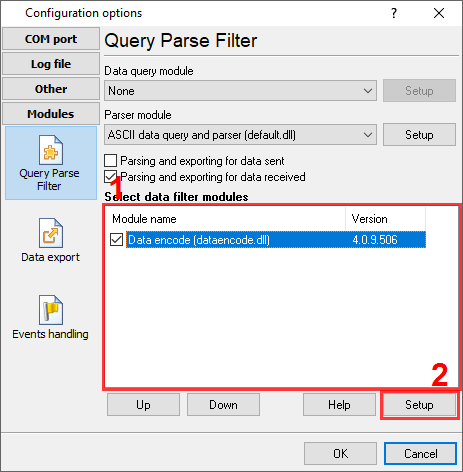
Fig.1. Selecting the plugin.
The figure below shows how to configure the plugin. Please, look at the documentation for the full description of all settings.
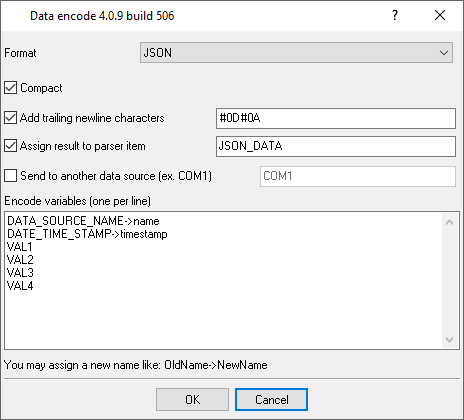
Fig.2. Configuring the plugin.
All plugins | Deadband | Expressions | Aggregator | Digital inputs filter | Script execute | Events generator | Redirect data | Redirecting data to a TCP server | Data timeout | Alarms Professional | Data Encode | Data From List | Failover | Summary statistics