
Latest version:5.0.1 build 1224.December 24, 2025.
The Alarms Professional plugin analyzes incoming parser data in real time. It logs alarm events when values cross configured limits. You can define alarm levels: LowLow, Low, High, and HighHigh, plus Digital for exact matches. Outputs include email, database ( MySQL , MS SQL, PostgreSQL or ODBC ), CSV, syslog, web services, or external applications. The plugin also records alarm end times and supports substitute variables (placeholders) for dynamic content.
Create groups to define how alarms are handled (the destination and an alarm message content). Each group can be enabled or disabled and sets a common log content and minimum logging rate.
Create alarm handlers and assign each alarm level. Handlers use parser variables or expressions to detect an alarm. Expressions can combine multiple parser values, apply arithmetic, or evaluate logical conditions. Use the deadband and logging max rate to reduce noise. You can also set daily or date-range disables, a delay time before logging, and a priority that will appear in outputs.
Email notifications: Create a group that sends email via an SMTP server. Use placeholders in Subject and body. Set resend options so repeat alarms send reminders only after a chosen interval.
Database logging: Configure a database group and enable “Create database table automatically”. You can use placeholders in table names, for example {PRIORITY}, so different priority alarms go to different tables.
CSV and syslog: For audit or integration with legacy tools, enable CSV output with a chosen separator. For centralized logging, enable syslog and set the target server IP.
Suppose a temperature sensor sends ASCII data like:
DATE_TIME_STAMP,TEMP_C,DEVICE_ID 2026-01-02 08:00:00,78.2,SENSOR-01
Parser extracts variables: TIMESTAMP, TEMP_C, DEVICE_ID.
Create an alarm handler that uses TEMP_C and defines two levels: High: TEMP_C >= 80 → Group: EmailTeam High High: TEMP_C >= 90 → Group: DBArchive
When a packet arrives with TEMP_C = 91.0, the plugin triggers “High High” and writes a message through “DBArchive”.
Alarms are evaluated only when a new data packet arrives from the parser. Between packets the module is idle. In multi-device configurations, enable “Control alarms for data sources separately” and include a device identifier in the corresponding field.
Download Documentation Buy Now!
The figure below shows how to select the plugin on the “Modules” page.
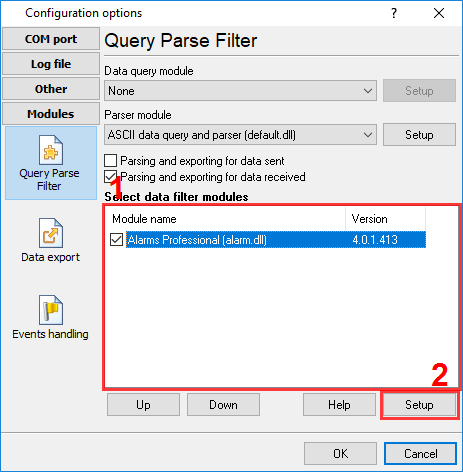
Fig.1. Selecting the plugin.
The figure below shows how to configure the plugin write all info about an alarm to a database, CSV and email at the same time.
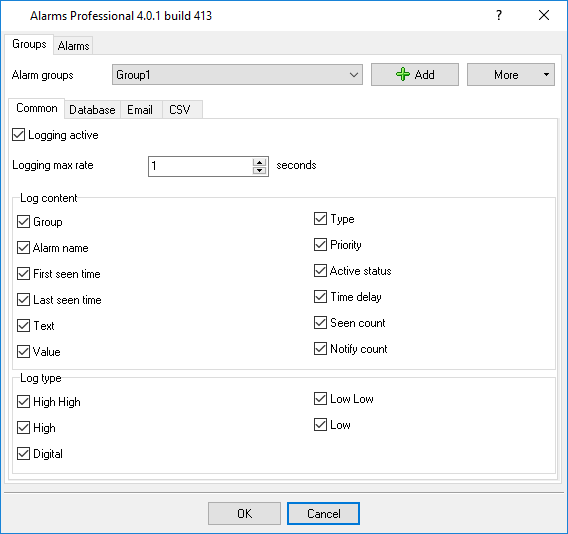
Fig.2. Configuring the plugin.
All plugins | Deadband | Expressions | Aggregator | Digital inputs filter | Script execute | Events generator | Redirect data | Redirecting data to a TCP server | Data timeout | Alarms Professional | Data Encode | Data From List | Failover | Summary statistics