
Latest version:5.0.1 build 1126.November 28, 2025.
The Scheduler & Hotkeymodule lets you run predefined tasks in our data loggers according to time schedules or operator hotkeys. It supports opening and closing data sources, sending data strings or hex sequences, creating new log files, and firing internal program events. Tasks can be ordered by priority so simultaneous triggers run in a predictable sequence.
You define one or more tasks and assign a trigger mode: hourly, daily, weekly, by days, monthly, after another task, or hotkey. The module monitors the task list while active and executes tasks automatically. Tasks in the list are executed top to bottom; use the “Up” and “Down” controls to change the priority. Changes are applied only after you click OK in the configuration dialog.
Example: Open COM1 at 2026-01-02 08:00 and start logging only during business hours. Create a task of type “Open data source” with argument “COM1”, mode “Daily”, Time = 08:00:00. Create the second “Close data source” task with argument “COM1”, mode “Daily”, Time = 17:00:00. This produces deterministic open/close behavior and reduces data volume outside working hours.
Example: Send a binary command to a TCP device on demand. Create the “Send data” task with the “#02CMD#03” string and assign a hotkey Ctrl+Alt+S. When the hotkey is pressed, the module sends the 6-byte sequence 0x02, ‘C’, ‘M’, ‘D’, 0x03 to every open data source defined in the current configuration.
Configuration:
The Scheduler & Hotkey module provides predictable automation for data acquisition and other tasks in our data loggers. It reduces manual intervention and scopes data capture to needed time frames.
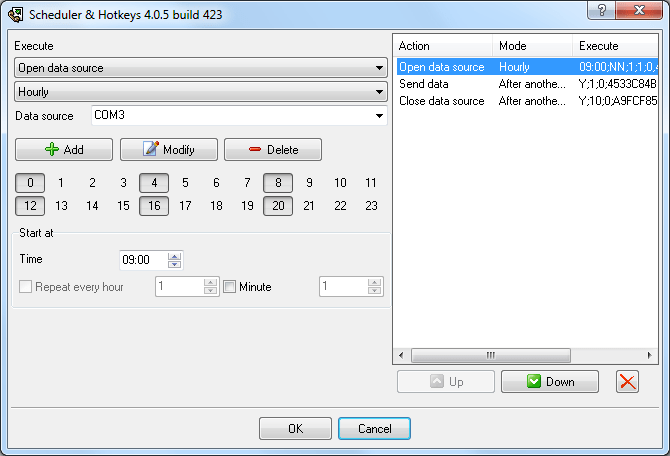
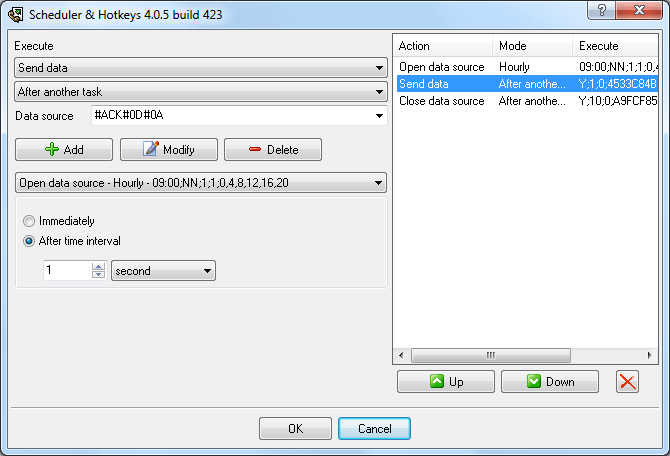
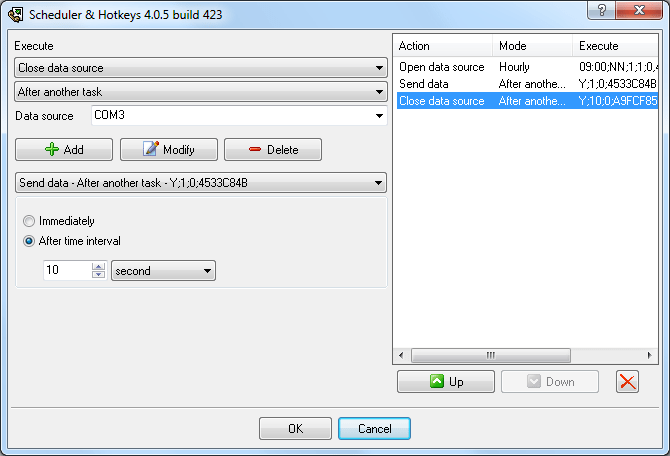
The following example demonstrates how to open a COM port, send a request, receive some data, and close the port.
All plugins | Events notification | Internet sharing | Scheduler & Hotkeys | Logs packing and compression | Import logs with data