
Chennai
Chennai
Singapore
Mumbai
Switzerland
+91 44 4091 2000 Mon - Fri 09:00 - 18:30 766/1, TEZ, Sakthi Towers 1, Anna salai, Chennai 600 002.
+6584181583 Mon - Fri 09:00 - 18:30 68 Circular Road, #02-01, 049422, Singapore.
+91 98848 35702 Mon - Fri 09:00 - 18:30 5, Powai Lake Heights, Mumbai 400 072
+41 (0)91 225 81 00 Mon - Fri 09:00 - 18:30 Equvera - ISV Techno SAGL, Via Ligornetto 6A, 6855 Stabio, Switzerland
Ceritified
ISO 9001:2018
The Best
#1 in India
#1 in Europe
#1 in Asian-pacific
Number #1
AUTOMATION SOLUTION PROVIDER
Talk to an Expert

CJ/T 188-2004

CJ/T 188-2004

Latest version:5.0.1 build 1126.November 28, 2025.

This plugin reads heat and energy meters that follow the Chinese CJ/T 188-2004 protocol. It supports RS-485, COM ports, and Ethernet. The software runs as a master station that polls multiple meters acting as slave devices. It handles half-duplex communication and a master-slave polling model. The plugin auto-detects measurement units and precision and presents values in a clear, consistent format.

Download Documentation

KEY CAPABILITIES

  • Supports serial and network interfaces for flexible deployment.
  • Polls multiple devices sequentially or on a schedule.
  • Customizable polling intervals and timeout settings.
  • Automatic decoding of units and device-specific precision.
  • Exports empty datasets with an error indicator after repeated failures (configurable).

INTEGRATION EXAMPLE WITH Equvera CoNNeX TCP/IP Data Logger

Use case: forward decoded meter readings to Equvera CoNNeX TCP/IP Data Loggerfor centralized storage and further processing. The plugin polls a meter and creates an export record. Equvera CoNNeX TCP/IP Data Loggerreceives that record and logs it to a CSV file or forwards it to a SCADA historian.

DEPLOYMENT TIPS

  • Use unique device addresses for each meter to avoid collisions.
  • Increase timeout on slow networks or when polling many devices.
  • Match device type to meter firmware to ensure correct decoding.
  • Enable export of failed requests during commissioning to verify communication stability.

Download Documentation

HOW TO ENABLE THIS PLUGIN

The figure below shows how to select the plugin on the “Modules” page.
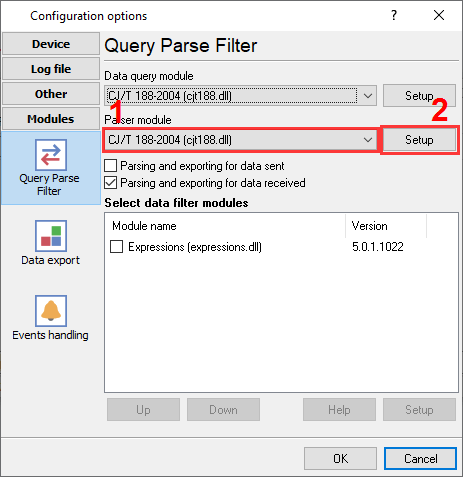
Selecting the CJ/T 188 parser plugin

Fig.1. Selecting the CJ/T 188 parser plugin.

HOW TO CONFIGURE THE PLUGIN

The figure below shows how to configure the plugin. Please, look at the documentation for the full description of all settings.
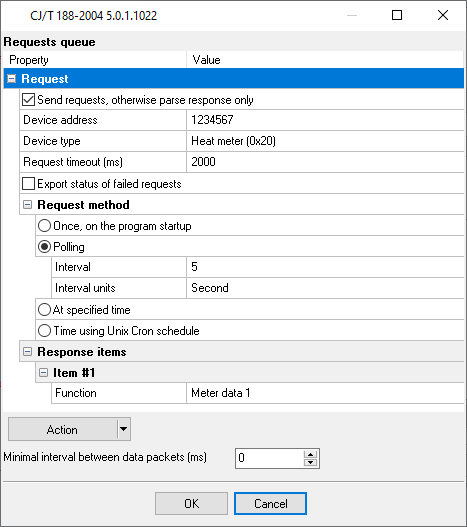
Configuring the CJ/T 188 data parser

Fig.2. Configuring the CJ/T 188 data parser.