
PYTHON SCRIPT
Latest version:5.0.1 build 1126.November 28, 2025.
The Python 3 pluginprovides a compact, direct API to extend Equvera CoNNeX DLS with custom scripts. Use Python scripts for parsing, filtering, exporting, and handling events. A single script can act as a parser and filter or as an exporter and event handler. Scripts run inside the host program and can access Python system libraries, timers, and threads. They must run quickly and must not use infinite loops.
TYPICAL USE CASES
Use the plugin to implement custom protocol parsers for serial devices, transform data before export, or trigger actions on events. Examples include converting binary sensor frames to standard numeric variables or filtering noisy telemetry values. The plugin ships with example scripts you can adapt for your task.
INSTALLATION AND SETUP
Install Python 3 for 32-bit systems (x86). Create scripts in your preferred editor; the plugin does not include an editor. In module settings, specify the full script file path and to the python3x.dll if it is not discovered automatically. After installing the module, review the supplied example scripts in the module folder and use them as templates.
PLUGIN API AND REQUIRED ENTRY POINTS
Scripts must expose named functions to be called by the host. Each function receives defined parameters and must respect performance constraints. Avoid blocking operations. The primary functions are FilterData, ParseData, ExportData, EventData, and an optional main initializer. Parsers must return three variables at least: FULL_DATA_PACKET, DATA_PACKET, and DATA_TIME_STAMP (the parser variable name for timestamps is DATE_TIME_STAMP).
INTEGRATION EXAMPLES WITH Equvera CoNNeX DLS
Integration scenario: serial temperature sensor with binary frames. A device sends frames:
[0x7E, id, temp_msb, temp_lsb, status, crc, 0x7F]
ParseData uses buffer.GetBytes() to accumulate incoming chunks, finds frame delimiters 0x7E/0x7F, validates CRC, and pushes variables:
- FULL_DATA_PACKET = b’\x7E\x01\x00\xFA\x00\xB2\x7F’
- DATA_PACKET = ‘temp=250,status=0’
- DATE_TIME_STAMP = ‘2026-01-02 08:00:00’
FilterData can convert raw temp_msb/temp_lsb to Celsius, apply calibration offset from module parameters, and remove implausible spikes. ExportData can forward the CSV line to to a file.
KEY FEATURES
- Easy Python 3 scripting for parser, filter, exporter, and event handler roles.
- Direct access to a buffer with incoming data using Clear, Shift, and GetBytes functions.
- Helpers for sending bytes and managing module parameters.
- Support for multi-client TCP data parsing using data source identifiers.
- Examples provided to accelerate real-world integration.
- Lightweight loader with optional main initializer of global variables.
PLUGIN SUMMARY
The plugin enables powerful, compact extensions written in Python 3 for parsing, filtering, exporting, and handling events. Follow the API contracts and buffer management rules to build reliable, high-performance integrations.
HOW TO ENABLE THIS PLUGIN
The figure below shows how to select the plugin on the “Modules” page.
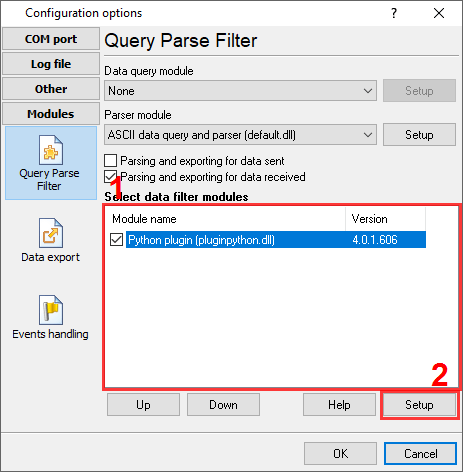
Fig.1. Selecting the plugin.
HOW TO CONFIGURE THE PLUGIN
The figure below shows how to configure the plugin. Please, look at the documentation for the full description of all settings.
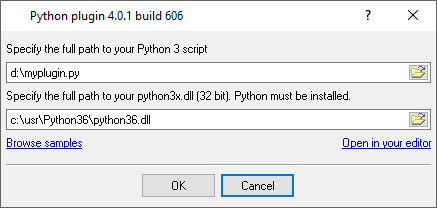
Fig.2. Configuring the plugin.