
0
Items : 0
Subtotal :  0.00
View CartCheck Out
Chennai
Chennai
Singapore
Mumbai
Switzerland
+91 44 4091 2000 Mon - Fri 09:00 - 18:30 766/1, TEZ, Sakthi Towers 1, Anna salai, Chennai 600 002.
+6584181583 Mon - Fri 09:00 - 18:30 68 Circular Road, #02-01, 049422, Singapore.
+91 98848 35702 Mon - Fri 09:00 - 18:30 5, Powai Lake Heights, Mumbai 400 072
+41 (0)91 225 81 00 Mon - Fri 09:00 - 18:30 Equvera - ISV Techno SAGL, Via Ligornetto 6A, 6855 Stabio, Switzerland
Ceritified
ISO 9001:2018
The Best
#1 in India
#1 in Europe
#1 in Asian-pacific
Number #1
AUTOMATION SOLUTION PROVIDER
Talk to an Expert
0
Items : 0
Subtotal :  0.00
View CartCheck Out

Send data to a port from a file

SEND DATA TO A PORT FROM A FILE

Problem scenario:

I need to be able to sendan HTML document out a serial port every 10 minutes. Do you have products for that?

Requirements:

  • File request

It is assumed that:

You’ve created a configuration (using the “Green Plus” button in the main window) and configured communication parameters (baud rate, the number of data bits, flow control, etc.) in the data logger, and you can receive any data without communication errors.

Solution:

PREPARING A FILE WITH DATA

First of all, you should prepare an HTML file. You may use an existing file or create a new one using an HTML editor.

SELECTING THE NECESSARY PLUGINS

You need to install and enable the “File requests” plugin. This plugin allows sending requests to a port using data from a file.
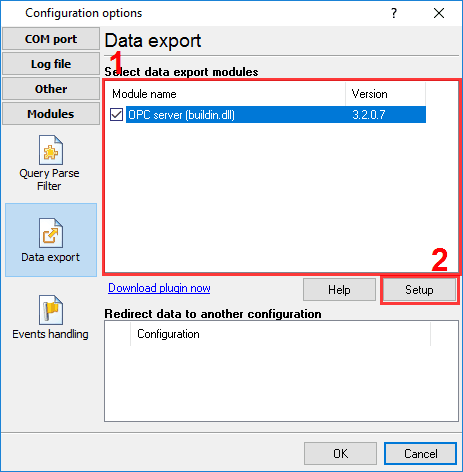
Selecting the plugin

Fig.1. File requests plugin

CONFIGURING THE “FILE REQUEST” PLUGIN

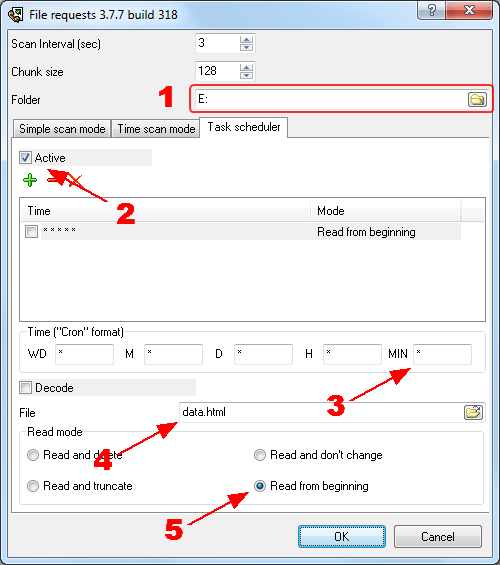
Please, open a configuration window of the File requestplugin (click the “Setup” button near a drop-down box in fig. 1, pos.2). The dialog window will appear on the desktop (fig. 2).
Send to serial port schedule

Fig.2. Send to port schedule

  1. Specify a folder with your HTML file;
  2. Activate task scheduler;
  3. Specify the time in the Cron format (see docs for a detailed description);
  4. Specify your file name (without path);
  5. Select the “Read from beginning” necessary mode in the “Read mode” group. In this mode, the program will repeatedly read a file and send it to a serial port.
RELATED ARTICLES: SEND DATA TO A PORT FROM A FILE