
You can use the “Write” tab (Figure 16) to write data to the tag’s memory (if the tag supports that action). This feature can be used only with tags that support the “Class-1 Gen-2” standard.
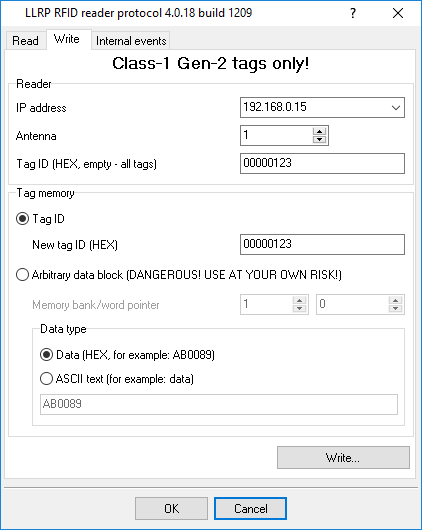
Figure 16: Writing data to the tag’s memory
IP address– The reader’s IP address. The reader should be duly configured, its IP address should be
specified in the TCP/IP settings (see “Configuring the connection with the reader”), and a connection with the reader should be established.
Antenna– The reader’s antenna number that can perform the write operation to the tag.
Tag ID– A unique identifier of the tag in HEX format.
Select the data writing mode in the “Tag memory” parameter group.
New tag ID– A new tag identifier. The application will automatically write the new identifier to the
correct memory area.
Arbitrary data block– You can write any data block to any memory bank, starting from any memory
cell.
Memory bank– The number of the memory bank:
WORD pointer— The start memory cell address for writing data. Memory cell numbering starts from 0. Each cell’s size is 2 bytes (WORD data type).
Note 1:A memory cell address should be specified, not a byte address in the memory. As each cell
contains 2 bytes, the size of data written (in bytes) should be a multiple of two.
Note 2:The size of each memory block depends on the tag’s maker.